


What is fielddrive?
fielddrive is your Onsite Events Partner
fielddrive is your onsite event technology partner, combining connected tools with hands-on expertise to help you run smoother in-person events. From self-service check-in and on-demand badge printing to session access, exhibitor lead retrieval and AI-powered analytics, we help you manage and understand what happens at the venue.
Our solutions connect with your existing registration platform, while our team helps you plan, set up and support your onsite operations. The result: shorter queues, less manual work and a clearer view of your event as it happens.
With fielddrive Insights, you can ask questions about your event data in everyday language and get AI-powered answers. Understand arrival patterns, session attendance and exhibitor lead activity to make informed decisions during your event and plan better for the next one.
This is your starting point for understanding fielddrive and the technology behind better onsite experiences. Explore answers about our solutions, integrations, pricing and support, alongside practical explanations to help you compare options and plan your next event.
fielddrive is an onsite event technology platform for in person events. It gives event teams self check in kiosks, live colour badge printing, facial recognition check in, lead retrieval for exhibitors, access control and real time reporting. The goal is simple: shorter lines at the door and better data after the event.
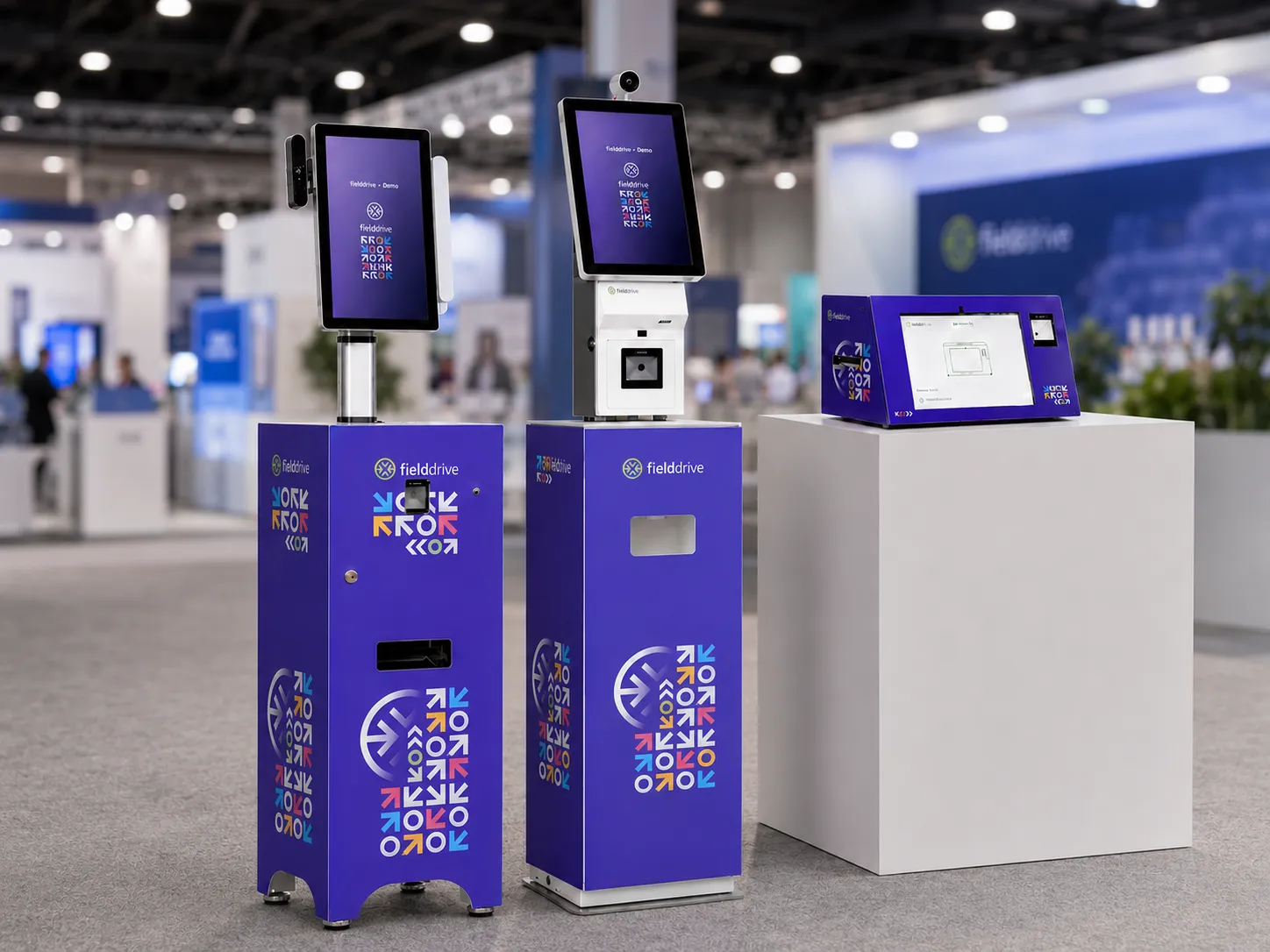
The main products are: check in kiosks (QR code, name lookup or facial recognition), on demand colour badge printing, fielddrive Leads (a lead retrieval app for exhibitors), session and access control scanning, kiosk branding for sponsors, and live dashboards. Onsite tech support is part of the service.
fielddrive operates independent.
The office is in Willebroek, Belgium. It has a registered office in San Francisco, USA, and has operations globally, so it can run events across Europe, North America, the Middle East, and Asia.
fielddrive has checked in more than 1,000,000 attendees at events around the world.
fielddrive brought facial recognition to event check-in in 2017. It was one of the first event tech companies to do this, and the joint solution won the Tech Watch Award at IBTM World in Barcelona.
Customers mostly praise two things: fast check in and a helpful onsite team. Event teams at United Soccer Coaches, Keller Williams, the Royal Microscopic Society, LEAF and IMEDEX have shared positive feedback, often saying the staff time saved makes the service worth it. You can read full case studies on fielddrive.com and reviews of fielddrive Leads on G2.
The attendee walks up to a kiosk and checks in with a QR code, a name search or their face. The kiosk confirms who they are and prints a personal colour badge in a few seconds. Every check in syncs to your dashboard and your registration platform as it happens.
A fielddrive kiosk can process up to 200 attendees per hour, including check-in and on-demand badge printing. Multiple kiosks can be deployed for larger arrival volumes, and the final plan is built around the peak arrival window, verification method, badge format, exceptions and venue layout.
Attendees opt in during registration and upload a photo. At the event, the kiosk camera matches their face to their registration and prints their badge right away. No QR code or phone is needed. Attendees who do not opt in simply use another method.
That is fine. They can check in with a QR code, a barcode or by looking up their name on the kiosk screen. Facial recognition is always optional.
Yes. fielddrive check-in and badge-printing solutions can continue in offline mode when venue connectivity becomes unreliable. The required attendee data must first be downloaded from the connected registration platform to the onsite kiosks. Check-ins and badge-printing activity are stored locally during the interruption and synchronize after connectivity returns.
Badges are not printed in advance. Each badge prints in full colour at the moment the attendee checks in, usually in about 6 seconds. This means late name changes, new registrations and lost badges are easy to handle, and there are no piles of unused badges at the end.
Yes. You can set up several badge templates and pick one based on attendee type. Use colour coding, role tags, sponsor space and custom fields so staff can spot VIPs, speakers, press and exhibitors at a glance.
Attendees can look up their records, correct permitted details and reprint badges through the kiosk workflow. For a walk-in, the attendee’s details are added to the connected event-registration platform and then synchronized with fielddrive. Once the record is available at the kiosk, the attendee can check in and print a badge with minimal delay.
fielddrive works with many registration platforms, including Cvent, Stova, Certain, EventsAir, Swoogo, IDloom and Bizzabo. If you use your own system, the team can look at a custom integration.
fielddrive Leads is an app for exhibitors. Booth staff scan attendee badges, add custom qualifying questions and notes, and see lead data in real time. It works offline, and exhibitors can download or email a full lead report from the app in one tap.
Yes. Through API integration, leads can flow into CRMs such as Salesforce or HubSpot within moments of a scan, so sales can follow up the same day.
Yes. Staff or self scanning at session doors records who attended which session. Access control lets you limit rooms or zones to certain attendee types, such as VIP areas or paid workshops.
Yes. fielddrive supports GDPR-compliant event workflows through defined data-processing terms, controlled access, appropriate security measures and consent-based optional facial-recognition check-in. Attendees can use configured non-biometric check-in methods, and organizers should document the purpose and permissions for the attendee data used at their event.
You get live dashboards showing check ins, arrival peaks, session attendance and lead activity. After the event you can export the data to measure attendance, no shows and exhibitor results.
Yes. fielddrive provides onsite support for hardware setup, badge-printing preparation, check-in flow testing, live troubleshooting and event-day operation. The support plan is matched to the size and operational requirements of the event.
Yes. Kiosks have custom side panels and screens you can brand with your event design or sell to sponsors as a branding spot.
CrowdComms is primarily an event app and attendee-engagement platform. fielddrive focuses on venue operations such as self-service check-in, live badge printing, optional facial recognition, access control, lead retrieval, event insights and onsite support. The two platforms address different parts of the event experience, with fielddrive designed for organizers looking for a dedicated onsite technology solution.
Accelevents is an all-in-one event platform that covers areas such as registration, ticketing and virtual or hybrid events, alongside onsite tools. fielddrive specializes in the onsite experience, including kiosks, live badge printing, optional facial recognition, access control, lead retrieval and onsite support. Organizers may choose fielddrive when they want a dedicated onsite solution that can work with their preferred registration or event platform.
Bizzabo is a broad event-management platform that includes registration, engagement and onsite capabilities. fielddrive is an onsite specialist focused on high-volume kiosk check-in, live badge printing, optional facial recognition, access control, exhibitor lead retrieval and event-day support. Organizers can select the onsite approach that best matches their operational requirements, and a supported integration can connect fielddrive with a Bizzabo-based event setup.
Yes. fielddrive can be used as an alternative for onsite check-in, badging and related venue workflows while Cvent continues to manage registration and the wider event programme. Through a supported integration, attendee records can feed fielddrive’s onsite workflows and agreed activity can synchronize back. This gives organizers another onsite option without requiring them to replace their Cvent registration setup.
No. fielddrive works with supported registration and event platforms, so organizers can keep their existing system for pre-event registration while fielddrive manages the configured onsite workflows. Attendee records can be prepared for check-in and badging, and agreed onsite activity can synchronize back through the available integration.
Cvent LeadCapture is a lead-retrieval option designed for events operating within the Cvent environment. fielddrive Leads is designed to work across different registration environments and provides offline scanning, custom qualification questions, notes, lead categorization, reporting and flexible device options. Both support exhibitor lead capture, while fielddrive Leads gives organizers a consistent option when their events use different registration platforms.
Each approach serves a different purpose. Self-service kiosks work well for standard arrivals and busy check-in periods, while staffed desks are valuable for VIPs, accessibility needs, walk-ins and complex exceptions. Many large events use a blended setup, with kiosks handling the predictable flow and an assisted position available when attendees need help.
Pre-printed badges can suit small events with a stable attendee list and a simple distribution process. On-demand printing is often a better fit when organizers expect walk-ins, corrections, reprints or a significant number of no-shows. Easy Badging can also combine pre-printed branded badge stock with live attendee-sticker printing.
QR codes are familiar and efficient for check-in and scanning workflows. Facial recognition can offer an optional low-friction route for attendees who give consent. RFID can suit events that need compatible tap-based or reader-based tracking infrastructure. The right choice depends on the attendee experience, privacy requirements, venue design, budget and the activity the organizer needs to record.
Yes. fielddrive runs high volume entry for trade shows with many kiosks, industrial badge printers, access zones for exhibitors and sponsors, real time dashboards and onsite staff for the morning rush. Exhibitors can also use fielddrive Leads at their booths.
Yes. The fielddrive Easy Badging package is made for events under 500 attendees, so smaller events can still get live badge printing without a large setup.
Conferences, trade shows, association congresses, corporate events, award ceremonies, member events and government events. Any in person event with registered attendees can use it.
Yes. fielddrive has run events across Europe, North America, the Middle East and Asia. For ICCA it handled events in Paris, Krakow, Bangkok and Abu Dhabi, including names in many languages and special characters on badges.
Clients include ICCA, the Belgian Association of Marketing (BAM), the European Commission, United Soccer Coaches, Keller Williams, the Royal Microscopic Society, IMEDEX and Vivium.
At the BAM Marketing Congress 2024, fielddrive used 8 kiosks to check in over 2,000 attendees with facial recognition, printed branded badges for all of them, and exhibitors captured about 650 qualified leads with fielddrive Leads.
Yes. More kiosks, faster check in and live arrival data help you spread people out and avoid long lines. The onsite team can also help plan where to place kiosks in the venue.
Sponsors can brand the kiosks, which every attendee sees on arrival. Exhibitors get fielddrive Leads to scan and qualify booth visitors and send leads to their CRM.
Yes. Badges are only printed for people who actually show up, so there is no waste from no shows or reprints. fielddrive also offers eco friendly printing options.
fielddrive pricing is quoted per event. The price depends on attendee numbers, number of kiosks, event days, badge stock, facial recognition, integrations and onsite staff. There are three main packages: Easy Badging (under 500 attendees), Flex Kiosks (around 500 to 1,000 attendees) and Premium Kiosks for larger events. Book a demo for a quote.
No. fielddrive provides the kiosks, printers and badge stock as part of the event service, and the team handles setup and support.
Start from your busiest hour. One kiosk handles about 200 attendees an hour. If 1,000 people arrive in the first hour, plan for about 5 kiosks plus one spare. For reference, BAM used 8 kiosks for 2,000 attendees. The fielddrive team will help you plan this.
As early as you can, ideally once your registration platform is chosen. This gives time to connect the integration, design badges, plan the venue layout and test everything before the doors open.
Usually: access to your registration platform or attendee list, your badge design or brand guide, attendee types, the venue floor plan, expected arrival times and power points near the entrance.
Yes. A replacement badge can be reprinted at a kiosk or help desk in seconds, because badges are printed on demand.
Go to fielddrive.com and book a demo. The team will walk you through the kiosks, badge printing, facial recognition and fielddrive Leads based on your event.
Event technology is the software and hardware used to plan, run and measure events. It covers registration and ticketing, onsite check in, badge printing, lead retrieval, event apps, access control and analytics.
Onsite event technology is the tech used at the venue on the day. Think self check in kiosks, badge printers, QR scanners, facial recognition, session scanning and live dashboards.
A check in app or kiosk replaces paper lists. It cuts wait times, stops badge fraud, records who actually attended, and gives you live data on arrivals. That data helps with headcounts, catering, safety and post event reports.
Send each attendee a QR code (or collect a photo for facial recognition) when they register. Set up self check in kiosks that read the code, look up the attendee and print the badge. Connect the kiosks to your registration platform so data stays in sync.
Onsite badge printing means printing each attendee's name badge at the venue when they check in, instead of printing all badges before the event. It keeps names correct and avoids waste.
For a small event, you can export your attendee list to a template and print on badge paper. For bigger events, use on demand printing: each badge prints at check in from live registration data, in full colour, in seconds.
Each attendee gets a unique QR code in their confirmation email. At the event they scan it at a kiosk, the system finds their record, and their badge prints right away. The badge can carry a QR code too, for session scans and lead retrieval.
Lead retrieval is how exhibitors collect contact details from people who visit their booth. Staff scan the attendee's badge with an app or device, add notes, and get the lead in a report or CRM.
If you exhibit at events and want to follow up with booth visitors, yes. Lead retrieval replaces business cards with badge scans, adds qualifying questions and sends clean data to sales fast. Organisers can also offer it to exhibitors as a paid add on.
It is a phone, tablet or handheld scanner running a lead retrieval app. Booth staff use it to scan attendee badges. Most events now use apps on phones or iPads, like fielddrive Leads, instead of rented scanners.
Booth staff scan a visitor's badge, which pulls in their registration details. Staff add ratings, answers or notes. Leads sync to a dashboard and can be exported or sent to a CRM for follow up.
Look for an app that is easy to learn, works offline, lets you add custom questions and exports leads fast. Simple pricing matters too. fielddrive Leads ticks these boxes and runs on iPad.
An RFID badge has a small chip inside. Readers at doors or sessions pick up the chip without a scan, so you can see when people enter rooms or zones. It is useful for session tracking and access control at big events.
It removes the slow parts: long lines, lost badges and paper forms. Fast check in, personal badges, easy session access and smooth networking leave attendees with a better first impression of your event.
Key trends include facial recognition check in, self service kiosks, on demand badge printing, AI for planning and attendee matching, real time attendance data, and lead retrieval that connects straight to CRM.
Choose a lead app with a CRM integration or API. Map the lead fields (name, company, notes, score) to CRM fields, test with a few scans before the event, and set leads to sync automatically so sales can follow up the same day.
Check where data is stored, who can access it, how long it is kept and whether attendees are told their data is shared with exhibitors. Ask the vendor for a data processing agreement and make sure exports are secure.
It is any tool that collects leads at events: badge scanning apps, business card scanners, kiosks with forms, and NFC or QR scans. The best tools also qualify leads and push them to your CRM.
fielddrive Entry is fielddrive’s onsite attendee-tracking, session-scanning and access-control solution. It uses QR-code scanning or name lookup to record activity at entrances, sessions and selected zones. Organizers can configure permission rules, monitor attendance and use the resulting data for live operations and post-event reporting.
fielddrive Insights is fielddrive’s connected event analytics and reporting layer. It brings together data from selected onsite touchpoints, including check-in, badging, session scanning, access control and lead retrieval. Organizers can use live dashboards, reports, post-event analytics and AI-assisted queries to understand onsite activity.
fielddrive Easy Badging is a compact check-in and attendee-sticker printing solution designed for events with up to 500 attendees. It combines a compact kiosk, QR-code or name-based check-in and live printing of attendee details onto pre-printed branded badges.
Yes. Organizers can use one fielddrive capability or combine check-in, badging, fielddrive Entry, fielddrive Leads and fielddrive Insights around the same event. For example, kiosks can manage arrivals, Entry can scan sessions and access points, Leads can support exhibitors and Insights can connect the resulting onsite data.
Yes. Scans at selected entrances, sessions and zones can be connected to map attendee journeys and estimate time spent in those areas. The quality of movement and dwell-time reporting depends on the number and placement of scanning points and whether both entry and exit activity are recorded.
Yes. fielddrive Leads can be planned for large exhibitor programmes. Organizers can configure licensing, device options, exhibitor onboarding, qualification setup, support and reporting around the event’s scale. Booth teams use their assigned apps or scanners, while organizers retain visibility across the programme.
Yes. fielddrive can support member check-in, onsite badge printing, walk-ins, session attendance, restricted-session access, multi-day programmes and exhibitor lead retrieval for association events. Organizers can continue using their supported membership, registration or event platform while fielddrive manages the onsite layer.
Yes. fielddrive can support high-security, regulated, invite-only and credentialed events. Available capabilities can include QR check-in, optional facial recognition, ID or document verification, secure badge issuance and controlled access. Verification rules and data handling are configured around the event’s requirements.
Yes. fielddrive deployments can be planned for multi-day programmes, several entrances, multiple scanning points and events operating across different locations. Badge formats, kiosk quantities, scanning devices, logistics and reporting are configured around the event schedule and venue plan.
Create Faster, Smarter Event Check-ins With fielddrive
From self check-in kiosks and QR event check-in to onsite badge printing and real-time arrival data, fielddrive helps event teams create smoother attendee arrivals.

Stay informed with us
Sign up for our newsletter today.