

.svg)
.webp)
Best Event Kiosk Software: Compared for Onsite Reality

TL;DR
- Top picks: fielddrive, Stova, and Cvent OnArrival. fielddrive meets all 12 feature checks, including ID scanning and full-color printing on supplied kiosks.
- Runner-up: Stova. It supports four check-in methods and can print badges offline.
- Cvent on-site registrations: Cvent OnArrival. Uses kiosk mode inside Cvent.
- For events with fewer than 1,000 attendees, Accelevents ships a kit that includes iPads, printers, and a router.
- We compared 12 specific kiosk features for each tool. We did not include price or user reviews.
Most attendees arrive just before the opening session. If you have only one check-in desk, lines build up, and badge processing slows. Venue Wi-Fi can also slow down when many people connect at once.
The best event kiosk software focuses on self-service stations. These let attendees check in and print badges as soon as they arrive. Here, we focus only on on-site self-service check-in, not on full event management platforms.
We reviewed 15 tools that combine event check-in software, self-service kiosks, and badge printers. We used the same 12 criteria for each. After reading, you will know which features matter most on event day and how to build your shortlist.
How We Built This Event Check-In Kiosk Solutions Comparison
Since we offer fielddrive, we set our scoring rules before starting and applied them to every tool, including our own. We collected data from product pages, help articles, and official app store listings.
This guide defines event check-in software with self-service kiosks, a software that allows attendees to identify themselves at an unattended station, verify their registration, and print their badge.
The chosen 12 criteria cover the features mentioned in the table below. Each tool earns one point for every feature confirmed in its own public materials, up to 12.
Best Event Kiosk Software for Self Check-In
What event check-in software supports self-service kiosks? All 15 tools below let attendees check in at an unattended station and print their own badge. They differ in how attendees identify themselves, what happens when the network drops, and who supplies the hardware.
Final Ranked Comparison Table
We checked each vendor’s public materials for these features.
Ranks 7 to 15 are grouped by the hardware used and the available check-in options. Expo Pass, EventMobi, and Bravura Technologies provide hardware but offer fewer check-in options. Eventify, Micepad, Eventdex, Whova, and Zoho Backstage use the tablets and printers you supply, so your team manages the hardware logistics. Bizzabo mentions offline check-in and its Klik SmartBadge wearable, but we could not find public information about its kiosk hardware.
Why the Top Pick Wins
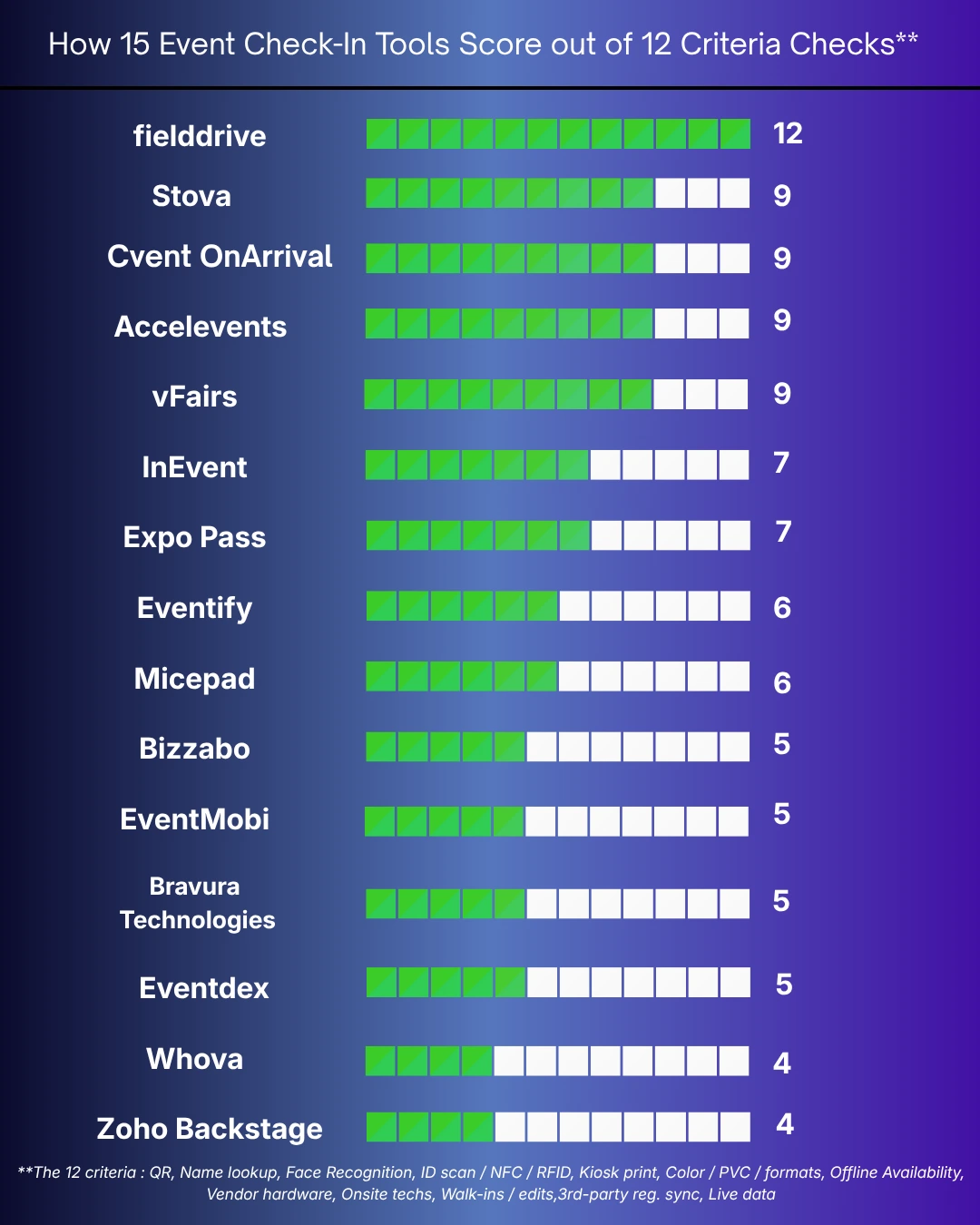
Top 4 out of 14 competitors scored 9 out of 12, only fielddrive scored a 12.
This gap matters when your registration and kiosk systems are different. Among the top 3 best onsite event check-in kiosk solutions in this comparison, only fielddrive offers registration-agnostic sync. Stova and Cvent OnArrival both add NFC or RFID credentials. Accelevents ships a ready-made onsite kit. vFairs sends its own technicians. But each expects your registration data to live inside its own platform.
The Top Six, Reviewed
fielddrive
Fieldrive is one of the best kiosk check-in software, best suited for conventions and trade shows. fielddrive is built for peak arrival times. Attendees can check in at self-service kiosks using a QR code, a name lookup, opt-in facial recognition, or a government ID scan. They can then pick up their badge directly at the same station.
We offer three kiosk models. The Apex model verifies IDs and documents. It prints paper or PVC badges for high-security events. The Premium model handles large conference crowds and offers full-color printing. The Edge model is compact and best for events with up to 500 guests. It prints sticker labels for pre-printed badges.
Our kiosk solutions for badge printing take about six seconds on average, though speed depends on the badge format and setup.
Facial recognition is optional. Anyone who prefers not to use it can check in with a QR code, scan their ID, or look up their name. Biometric data is pseudonymized, encrypted, and stored separately from other personal data. For ID checks, only the verification result is saved, not the document scan.
Our event check-in software integrates with registration tools and CRMs, including Cvent, Swoogo, Stova, Salesforce, and HubSpot. A local team can manage setup, testing, and live support. You can also view kiosk check-ins in real time on a dashboard.
Stova
Stova’s iPad app includes an event check-in feature that runs in a branded, password-protected kiosk mode. Attendees can check in by scanning a QR code or entering their name or email. Stova also offers facial recognition kiosks and contactless NFC check-in with its badgeNEXT printing module.
Once the attendee list is synced, you can check in guests and print badges even without an internet connection. When you’re back online, the app automatically syncs the latest data.
Stova can provide the kiosks, printers, tablets, and scanners you need based on your event setup. They also offer on-site support and training to help your team get up and running.
For sessions, RFID scanners can track attendance and monitor room capacity in real time. This gives your team a clearer view of who is attending and when rooms are reaching capacity.
Cvent OnArrival
OnArrival is Cvent's tool for event check-in and badge printing. Attendees can use iPad kiosks to check in by scanning a QR code. They can also search by name, email, company, or confirmation number. At the kiosk, guests can register, sign forms, pay, preview their badges, and print them.
Cvent notes that OnArrival works even with poor internet connections. It can also track session attendance with optional RFID or NFC badges. For equipment, Event-in-a-Box offers a do-it-yourself kit. If you prefer full support, OnArrival 360 provides a dedicated project manager, kiosks, printers, and scanners.
Accelevents
Accelevents lets you use an iPad or Android tablet as a check-in kiosk. Attendees can print badges by scanning a QR code or typing their information. Walk-in guests can also sign up and buy tickets at the kiosk. Staff can check people in with an RFID-enabled iPhone, too.
The system works without an internet connection. Accelevents also offers an Onsite Kit. It comes with pre-set iPads, printers, badge paper, and a router. Accelevents suggests this kit for events with fewer than 1,000 guests. The platform prints in black and white on its own. For color printing, you need PrintNode, software that runs on a separate laptop.
Accelevents' public materials didn't mention facial recognition, onsite tech help, or third-party registration integrations.
vFairs
Attendees can check in at branded kiosks using facial recognition or by scanning a QR code sent by email. For facial recognition, attendees upload a photo during registration, and the kiosk matches it on arrival before printing the badge. Staff can also look up attendees by name and register walk-ins on the spot.
vFairs runs on standard iPads, tablets, and smartphones. It connects to Epson, Zebra, Brother, and HP printers. Zebra printers can print PVC badges on-site. It also prints adhesive labels for pre-printed badges. vFairs can provide branded kiosk hardware and send technicians for setup and support.
We found some information gaps in vFairs’ materials. They do not document offline behavior, offline platforms, or the use of NFC and RFID credentials.
InEvent
The InEvent Kiosk app works on iPad, iPhone, and Mac. It offers three check-in options: scanning a QR code, searching by name or email, and using Face AI. The Face AI tool matches attendees to their profile photos to check them in, which uses AI credits. InEvent is built to work offline. The app downloads the event database to the device, so it can keep scanning and printing without an internet connection. It updates the data once it reconnects. The app also supports NFC. It keeps facial information safe by storing it as an encrypted code, which is automatically deleted after the event.
We found no information about vendor-provided hardware, on-site technicians, walk-in registration, or linking with other registration platforms.
How to Choose the Right App for Your Requirement?
Start by looking at your arrival pattern, not just the feature list. This helps you turn the comparison above into a testable shortlist.
- Estimate your busiest hour. Divide the number of arrivals by each vendor’s stated throughput per kiosk. Then add one extra kiosk as a backup.
- Find out where your registration data is stored. If it is in the platform you are buying from, native kiosk mode avoids extra steps. If not, test the sync process.
- List all types of arrivals. Plan for QR code holders, walk-ins, VIPs, speakers, and anyone needing an ID check.
- Choose your badge format first: thermal labels, full-color paper, or PVC. Not every tool prints every type.
- Test offline mode during your demo. Turn off Wi-Fi and mobile data, check someone in, print a badge, then reconnect.
- Decide who will run the kiosks. Your staff can set up and troubleshoot, or the vendor can send technicians. Compare the costs for each option.
- Set up an exception lane. A staffed desk for edits and issues keeps your self-service lines moving.
If you are going to use facial recognition, you should involve your data protection lead. According to Article 9 of the EU GDPR, biometric data used for the purpose of identifying a person is classified as "special category data" and is therefore subject to more stringent rules. Moreover, the UK Information Commissioner's Office (ICO) stated in its 2024 biometric guidance that explicit consent is probably the only legally valid basis in most cases.
The ICO guidance also states that people who opt out must receive an equal alternative. At a kiosk, this means providing a QR code or name search on the same screen. As a result, opting out will not cause a longer wait
Final Verdict on the Best Event Kiosk Software
The best event kiosk software keeps check-in moving when things get busy. It should also give your team a way to handle common issues, like missing QR codes, name changes, or a lost internet connection.
When you compare vendors, a live demo is often more useful than a long list of features. It gives you a chance to see how the system actually handles the situations your team is likely to face on-site.
We checked 12 features against public documentation across the leading platforms, and fielddrive was the only one that offered all 12. It supported four check-in methods, on-demand color badge printing, offline check-in, registration syncing, and on-site staff support.
Stova, Cvent OnArrival, Accelevents, and vFairs each met 9 of the 12 criteria. Each performed well within its respective platform, but fielddrive offered the most complete set of check-in capabilities in our test.
Ask our on-site experts how many kiosks you need, which badge formats to use, and about offline coverage for your next event.
Frequently Asked Questions
It varies by vendor. In our comparison, fielddrive, Stova, Cvent, Accelevents, vFairs, Expo Pass, EventMobi, and Bravura offer kiosks or kits. Other companies, such as Whova, Micepad, and Eventdex, use the standard iPads and printers you supply. Make sure that your quote includes badge stock, routers, and on-site technicians.
Fielddrive was the only tool to pass all 12 feature checks, and it performed best in every case. Stova, Cvent OnArrival, Accelevents, and vFairs each passed nine of the checks. Yet the best choice for you will still depend on where you are registering, the times of your peak arrivals, and whether or not you need identity checks.
To work out how many kiosks you need, start with your busiest arrival hour. Divide the expected arrivals by the number of people one kiosk can process per hour, then add one kiosk as a backup.
For example, if 600 people are expected to arrive in the first hour and each kiosk can handle 200 attendees, you would need two kiosks running and one backup. That gives you enough capacity to keep check-in moving if one kiosk has an issue.
As of 2026, fielddrive kiosks can process up to 200 attendees per hour.
Often, if arrivals cluster or badge details change late. A tablet kiosk with a label printer works well for a few hundred people. For larger events, fielddrive's Edge kiosk can handle up to 500 attendees. For a very small event with steady arrivals, a staffed desk with a check-in app may be enough.
A check-in app runs on a staff member’s phone or tablet, letting them scan attendees as they arrive. Event kiosk software turns a station into a self-service check-in point with a scanner and badge printer. Many vendors offer both options, so you can use the same attendee list across kiosks and staffed check-in lanes.
Pricing varies between vendors. Some charge per event, while others include kiosk features as part of a broader platform license. Hardware, badge stock, and on-site staff may also incur additional costs.
For example, as of 2026, EventMobi prices BadgeON based on attendee volume. When comparing vendors, ask for an itemized quote that breaks out software, hardware, and services. This gives you a clearer view of the total cost and makes it easier to compare options.
Many kiosk tools work best with their own registration system, so check the connection before you commit. fielddrive connects with platforms including Cvent, Swoogo, and Stova, while Eventify and Micepad support imports from other systems. During the demo, test a live sync with late registrations and edits.

.svg)
Want to learn how fielddrive can help you elevate your events?
Book a call with our experts today


.svg)