

.svg)
.webp)
Custom event badges for trade shows and conferences: How to design badges that do more than display names
Learn how custom event badges improve trade show check-in, networking, branding, security, sustainability, and attendee experience. Explore fielddrive’s onsite badging options.

For trade shows and conferences, badges are tiny rectangles doing a suspiciously large amount of work.
They help attendees identify each other, guide staff at access points, support sponsor visibility, enable lead retrieval, power session tracking, and set the tone for the entire onsite experience. A badge is not just a name card. It is a wearable access pass, networking cue, brand asset, data point, and memory token rolled into one.
That is why tradeshow badging deserves more attention than it often gets. A generic badge can get people through the door. A well-designed custom event badge can improve attendee flow, simplify networking, reduce onsite confusion, support sustainability goals, and turn every attendee into a moving brand surface.
With fielddrive’s event badge printing solution, organizers can design and print custom badges onsite, make last-minute design changes, choose from multiple badge materials, and support sustainable badging options such as recyclable paper and eco-friendly ink. fielddrive’s badge page also highlights options like GreenPass, DuraPass, and ShowPass, each designed for different event needs.
TL;DR
Custom event badges help trade shows and conferences create faster check-ins, clearer attendee identification, better networking, stronger event branding, and more flexible onsite operations.
The best tradeshow badging setup should include:
- Clear attendee names, job titles, company names, and roles
- Strong event branding and sponsor visibility
- QR codes or barcodes for check-in, lead retrieval, and access control
- Icons, colors, or labels for attendee categories and permissions
- Personalized fields such as agendas, dietary preferences, access levels, or session information
- Sustainable materials where possible
- On-demand onsite badge printing to reduce waste from no-shows and last-minute changes
fielddrive supports custom onsite badge printing with flexible badge design, sustainable material options, live color badge printing, and badge types such as GreenPass, DuraPass, ShowPass, and PVC-based badges for events that need a more durable finish.
Why custom event badges matter at trade shows and conferences
Trade shows and conferences are movement-heavy environments. Attendees arrive in waves. Exhibitors want quick conversations. Sponsors want visibility. Staff need to manage access. Organizers need reliable data. Everyone is trying to move, scan, meet, enter, exit, and remember who they just spoke to.
That is where custom event badges earn their keep.
A good badge answers important questions instantly:
- Who is this person?
- Which company are they from?
- Are they an attendee, speaker, VIP, exhibitor, press member, sponsor, or staff member?
- Can they access this session, lounge, meeting room, or hosted-buyer zone?
- Can exhibitors scan this badge for lead retrieval?
- Does this attendee have dietary preferences, accessibility needs, or special entitlements?
When badges are designed with these jobs in mind, they become part of the event operating system.
What should a custom event badge include?
A strong badge design balances clarity, branding, data, and usability. The trick is to make it useful without turning it into a tiny billboard that got lost in a spreadsheet storm.
1. Attendee name and company
The attendee’s name should be the visual anchor. It needs to be readable from a comfortable networking distance, especially in busy expo halls, reception areas, and conference corridors.
For most trade show badges and conference badges, include:
- First name
- Last name
- Company name
- Job title, if relevant
- Country, region, or chapter, if useful for networking
For executive events, hosted-buyer programs, or association meetings, company and role can be as important as the name itself.
2. Attendee category
Custom badges should make attendee types easy to identify. This can be done through color bands, labels, icons, or badge footer text.
Common categories include:
- Attendee
- VIP
- Speaker
- Exhibitor
- Sponsor
- Media
- Staff
- Buyer
- Hosted buyer
- Partner
- Student
- Delegate
At larger conferences, this can prevent a lot of “do you have access?” awkwardness at the door.
3. QR codes or barcodes
QR codes and barcodes are central to modern tradeshow badging. They can support:
- Fast attendee check-in
- Lead retrieval for exhibitors
- Session scanning
- Access control
- Badge reprints
- Attendance tracking
- Onsite analytics
For example, fielddrive Leads allows exhibitors to scan badges, capture leads, qualify them, analyze lead activity, and share visitor data in real time.
4. Event branding
Badges are one of the most visible onsite brand assets at a trade show or conference. Unlike banners, they move with attendees. Unlike booth walls, they enter sessions, lounges, networking events, and post-event photos.
A custom badge can include:
- Event logo
- Event colors
- Theme graphics
- Sponsor logo
- Partner branding
- Track or zone branding
- Personalized design for attendee groups
This is especially useful for multi-track conferences, association events, hosted-buyer programs, and trade shows with strong sponsor packages.
5. Iconography
Icons can simplify badge reading. Instead of relying only on text, organizers can use icons to show:
- Meal preference
- Accessibility support
- VIP status
- Speaker status
- Session track
- Security clearance
- Networking group
- Hosted-buyer status
- Certification or membership level
When used well, iconography works like a quiet little traffic marshal for the event floor.
6. Personalized agendas
For conferences with multiple sessions, workshops, meetings, or hosted-buyer schedules, personalized agendas can be printed directly on the badge or on a companion badge insert.
This helps attendees move through the day without constantly checking an app, inbox, or printed program.
Personalized badge content can include:
- Session schedule
- Meeting slots
- Room names
- Track information
- Meal timing
- Workshop assignments
- Access zones
fielddrive’s badge printing page notes that attendee information can include names, job titles, company names, and even personalized event schedules.
7. Dietary preferences and access notes
For events with seated meals, receptions, VIP dinners, or hosted programs, dietary details can help staff serve attendees faster and with fewer errors.
Examples include:
- Vegetarian
- Vegan
- Gluten-free
- Nut allergy
- Kosher
- No alcohol
- Accessibility support
- Interpreter required
These details should be handled carefully and only displayed where operationally necessary. For some events, icon-based systems or coded indicators may be better than full text.
.avif)
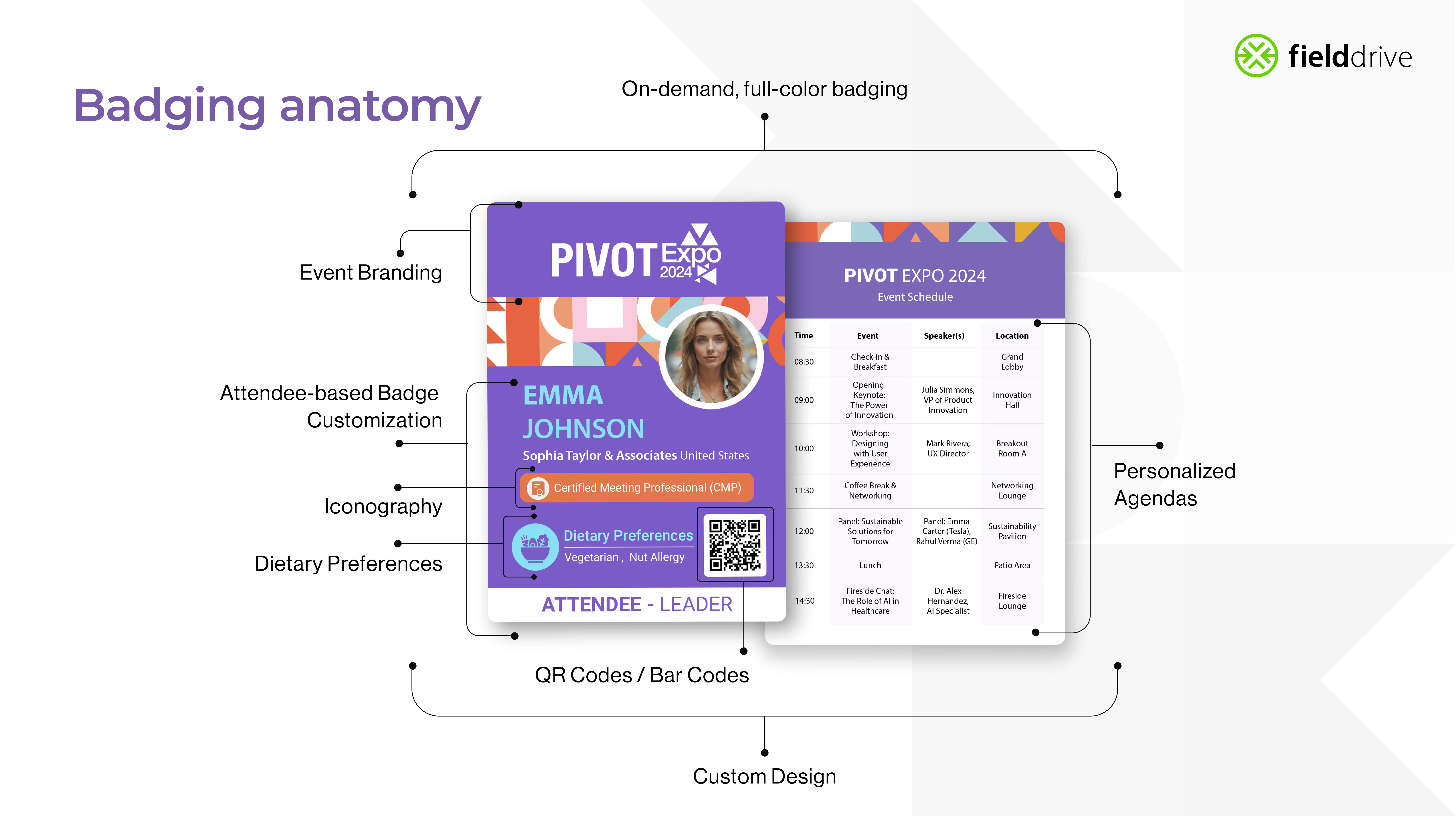
The anatomy of a high-performing trade show badge
A custom trade show badge should be built around both the attendee experience and the onsite team’s needs.
Here is a practical badge anatomy:
- Top section: Event logo, sponsor branding, or event them
- Main section: Attendee name, company, role, and photo if needed
- Middle/lower section: Attendee category, icons, access indicators, or personalized information
- Scan zone: QR code or barcode placed with enough clear space for reliable scanning
- Footer: Badge type, attendee role, sponsor strip, or event edition
- Back side: Agenda, venue map, emergency details, sponsor message, or session schedule
The design should make the most important information instantly readable. Everything else should support the journey, not mug the badge with visual confetti.
On-demand badge printing vs pre-printed badges
Pre-printed badges can work for small, predictable events. But trade shows and conferences are rarely that tidy. Attendees register late. VIPs get added. Speakers change titles. Companies update names. Walk-ins appear. Sponsors request final-minute branding changes. The badge desk becomes a small weather system.
That is why onsite badge printing is increasingly valuable.
With on-demand badge printing, organizers can:
- Print badges only when attendees arrive
- Reduce waste from no-shows
- Update attendee details before printing
- Handle walk-ins more smoothly
- Reprint damaged or lost badges
- Adjust badge designs onsite
- Support multiple badge types from one setup
fielddrive’s badge printing solution supports badge customization and last-minute design changes, helping organizers adapt when onsite reality decides to tap-dance across the plan.
How custom badges improve trade show networking
At trade shows, networking can be gloriously chaotic. Attendees meet dozens of people, exhibitors scan hundreds of leads, and everyone leaves with a head full of half-remembered names.
Custom badges make networking easier by making the right information visible at the right time.
A badge can help attendees quickly understand:
- Who someone is
- What company they represent
- Whether they are a buyer, exhibitor, partner, speaker, or sponsor
- Which industry or region they belong to
- Which event track or interest group they are part of
For exhibitor-heavy events, badges also become the bridge between conversations and follow-up. When paired with a lead retrieval app, each badge scan can capture attendee details, qualification notes, booth activity, and follow-up context.
How tradeshow badging supports sponsors and exhibitors
Custom event badges can also create sponsorship opportunities.
Badge branding can include:
- Sponsor logos
- Sponsor color strips
- Sponsored lanyards
- Track-specific sponsor branding
- VIP badge branding
- Hosted-buyer badge branding
- Networking reception sponsor branding
Because attendees wear badges throughout the event, badge sponsorship can offer persistent visibility across check-in, sessions, expo floors, networking zones, and post-event photos.
For trade shows, this is particularly useful because sponsors want measurable exposure and exhibitors want better lead capture. fielddrive’s broader onsite ecosystem also supports exhibitor ROI through fielddrive Leads, which enables badge scanning, lead qualification, real-time lead data, and reporting.
Sustainable event badges: better badging with less waste
Sustainability is now a practical consideration for event teams, not a decorative sentence in a post-event report.
Traditional badge setups can create waste through:
- Pre-printed badges for no-shows
- Plastic badge holders
- PVC-based materials
- Disposable inserts
- Reprints caused by data errors
- Shipping excess materials to the venue
On-demand badge printing helps reduce waste because badges are printed only when attendees check in. fielddrive’s sustainable badge options are printed on recyclable paper with eco-friendly ink, and its zero-plastic badge approach avoids plastic holders.
fielddrive badge options
fielddrive’s onsite name badge printing offers different badge options for different event needs:
The key is choice. Not every event needs the same badge. A one-day sustainability summit, a three-day medical congress, a high-security corporate event, and a sponsor-heavy trade show all have different badging needs.
Custom badge design ideas for trade shows and conferences
Here are practical ways to make custom event badges more useful.
Use color coding for fast recognition
Color coding helps staff and attendees identify badge categories quickly.
Examples:
- Purple for speakers
- Blue for attendees
- Gold for VIPs
- Green for exhibitors
- Red for staff
- Black for security
Keep color contrast strong and avoid using too many categories. A badge should not look like it lost a fight with a packet of highlighters.
Add clear attendee hierarchy
Make the most important information largest.
Suggested hierarchy:
- First name
- Last name
- Company
- Role or title
- Attendee type
- QR code or barcode
- Supporting details
For networking-heavy events, first names should be especially visible.
Include access indicators
For conferences with restricted zones or premium experiences, badges can show access permissions.
Examples:
- VIP lounge
- Speaker room
- Press room
- Hosted-buyer meetings
- Gala dinner
- Workshop access
- Executive roundtable
- Partner zone
This reduces manual checking and helps staff manage movement more smoothly.
Create badge variants by persona
Different attendees need different badge layouts.
For example:
- Attendees: Name, company, QR code, schedule
- Speakers: Name, title, session track, speaker icon
- Exhibitors: Name, company, booth number, QR code
- VIPs: Name, organization, VIP marker, lounge access
- Staff: Name, team, role, emergency contact or radio channel
- Media: Name, publication, access level
Persona-based badges make large events feel better organized without requiring attendees to decode a secret badge alphabet.
Use the badge back wisely
The back of the badge can hold useful information without cluttering the front.
Good uses include:
- Venue map
- Agenda highlights
- WiFi details
- Emergency contact
- QR code for event app
- Sponsor message
- Shuttle schedule
- Help desk location
For trade shows, a back-side sponsor placement can also be a neat monetization opportunity.
How fielddrive supports custom event badges
fielddrive combines onsite event badge printing, kiosk-based check-in, sustainable badge materials, and onsite support to help organizers deliver smoother badge experiences.
With fielddrive’s event badge printing, organizers can:
- Print custom badges onsite
- Personalize badges with attendee information
- Make last-minute badge design changes
- Choose from different badge types
- Use sustainable badge materials
- Reduce waste from no-shows
- Support recyclable and zero-plastic options
- Print attendee schedules and category details
- Use badges alongside lead retrieval, check-in, and analytics workflows
fielddrive also supports live color badge printing through its touchless event check-in kiosks, which offer check-in options such as QR/barcode check-in and name lookup, along with live onsite badge printing and offline badge printing support.
For events that want faster, more flexible check-ins, fielddrive also offers facial recognition check-in, designed with attendee consent and opt-out options.
And once badges are in use, organizers can connect badge activity to wider onsite workflows, including fielddrive Leads for exhibitor lead capture and fielddrive Analytics for event data and reporting.
Best practices for custom event badge printing
1. Design for distance
Attendee names should be readable from a few feet away. This matters more than squeezing in every possible detail.
2. Keep scan zones clean
QR codes and barcodes need enough white space. Avoid placing them too close to edges, busy patterns, or reflective surfaces.
3. Test badge designs before the event
Print test badges before going live. Check readability, scan performance, color contrast, data fields, and lanyard placement.
4. Plan for badge reprints
Lost badges happen. Typos sneak in wearing tiny shoes. Reprint workflows should be simple, fast, and controlled.
5. Match material to event format
A one-day conference may not need the same badge material as a multi-day trade show. Choose based on durability, sustainability, branding, and budget.
6. Avoid overcrowding
A badge should not carry the emotional burden of your entire event app. Keep the front clean and use the back for secondary information.
7. Connect badges to event goals
- For networking, prioritize names and companies.
- For access control, prioritize categories and permissions.
- For exhibitions, prioritize scannability.
- For sustainability, prioritize materials and on-demand printing.
- For sponsorship, prioritize high-visibility branding zones.
.avif)
Conclusion
Custom event badges are no longer just name tags. For trade shows and conferences, they are part of the onsite engine.
They help attendees network, exhibitors capture leads, sponsors gain visibility, staff manage access, and organizers deliver a smoother check-in experience. When paired with onsite badge printing, smart customization, sustainable materials, and integrated event technology, badges become a small but mighty tool for better event flow.
With fielddrive’s custom event badge printing solution, organizers can create personalized, sustainable, on-demand badges that support branding, access control, attendee experience, and real-time onsite operations.
Because at a busy trade show, the badge is not just something attendees wear. It is the first handshake your event makes.
FAQs
What is tradeshow badging?
Tradeshow badging is the process of designing, printing, issuing, and managing attendee badges for trade shows, exhibitions, conferences, and other onsite events. These badges usually include attendee names, company details, categories, QR codes or barcodes, and event branding.
Why are custom event badges important?
Custom event badges improve networking, attendee identification, access control, event branding, sponsor visibility, and onsite data capture. They help attendees move through the event more easily and help staff manage the event with fewer manual checks.
What should be included on a trade show badge?
A trade show badge should usually include the attendee’s name, company, job title, attendee category, event branding, and a QR code or barcode. Depending on the event, it may also include a personalized agenda, dietary preference, access level, booth number, or sponsor branding.
Are onsite printed badges better than pre-printed badges?
For many trade shows and conferences, onsite badge printing is more flexible than pre-printing. It helps organizers handle last-minute registrations, data changes, walk-ins, reprints, and no-shows while reducing unused badge waste.
Can custom badges support lead retrieval?
Yes. Badges with QR codes or barcodes can support lead retrieval. Exhibitors can scan attendee badges to capture lead information, qualify prospects, add notes, and follow up after the event.
What are sustainable event badges?
Sustainable event badges use recyclable, biodegradable, or lower-waste materials and reduce the need for plastic holders or unnecessary pre-printing. On-demand badge printing also supports sustainability by printing badges only when attendees arrive.
What badge options does fielddrive offer?
fielddrive offers GreenPass, DuraPass, and ShowPass badge options, each suited to different event needs. GreenPass focuses on biodegradable pure paper and recyclability, DuraPass is designed for tear resistance and multi-day use, and ShowPass supports full-bleed printing with a thicker cardboard feel. fielddrive is also bringing a new PVC-based badge option for events that need a more durable, card-like format.
Can fielddrive customize badges for different attendee types?
Yes. fielddrive supports custom event badge designs with attendee names, job titles, company names, personalized schedules, colors, icons, branding elements, and category-based differentiation.
.svg)
.svg)
.svg)
Want to learn how fielddrive can help you elevate your events?
Book a call with our experts today


.svg)